Hospitality, Google Business Profile, Local SEO
How to get your hotel on Google Maps, and use Google's free booking links
How to list your hotel, lodge or resort on Google Maps: claim and verify it, pick categories, add photos, answer reviews and use free booking links.
, 6 min read
"Guests find us on Booking.com, so why don't we show up properly on Google Maps?" If that's your hotel, the cause is often a Google listing that nobody ever finished setting up.
It costs you more than a missing pin. When a traveller searches your hotel's name, Google shows photos, reviews, a map and a list of prices from booking sites. If your own website isn't in that list, a guest who already wanted you may book through a platform, and you pay the commission Booking.com charges on a guest you won yourself.
Here's how to get listed, step by step, and how Google's free booking links work. Google renames its buttons from time to time, so the labels on your screen may differ a little.
Step 1: check whether you're already on the map
Search your property's name on Google Maps before you create anything. A listing may already exist, added by a guest or pieced together by Google from other sources.
If it does, claim it. A second listing for the same hotel splits your reviews and confuses guests.
On an unclaimed listing, look for "Claim this business" or "Own this business?". If there's nothing at all, add your property through Google Business Profile.
Either way, Google then asks you to prove you run the place. It decides which methods to offer, and for many businesses that's a short video showing the sign, the building and something only staff can open, such as reception or the office.
Once you're in, drag the pin to the gate or entrance guests arrive at. A safari camp near the Mara or a lodge on a dirt road outside Arusha should test "Directions" from the nearest town and make sure it ends at the right turn-off.
Step 2: choose categories that match how guests search
Your primary category tells Google what kind of place you are. Pick the most specific one that's true: Google's list includes Hotel, Resort hotel, Lodge and Guest house, among many others. Then add secondary categories only for things guests can really book.
A beach resort in Diani might pick Resort hotel and add Wedding venue if it hosts weddings. A guest house in Kisumu shouldn't call itself a resort to look grander, because a category that doesn't fit breaks Google's guidelines.
Hotel profiles also let you fill in check-in and check-out times and tick amenities such as Wi-Fi, a pool, breakfast or an airport shuttle. Fill in every one that applies. Guests filter on them.
Step 3: add photos that answer guests' questions
Guests judge a hotel on Google by its photos, and they'll see other guests' photos next to yours. Upload your own pictures of every room type, the bathrooms, the view, the pool or beach, a real breakfast and the way in. Then add new ones every few months, so the newest photo on your profile is never a year old.
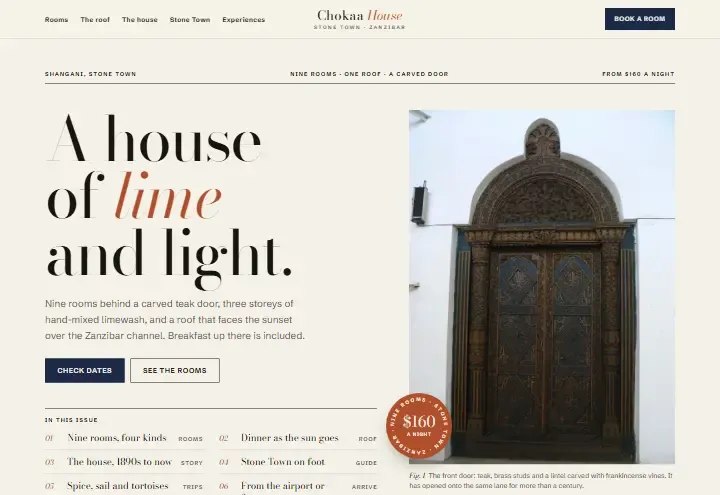
The way in matters more than owners expect. Cars can't reach many doors in Stone Town, and the Chokaa House concept, a nine-room hotel we designed for an invented business there, tells guests the last 150 metres are on foot with a porter. A photo of your door, the nearest landmark and the drop-off point saves a lost guest a phone call at midnight.
Use the same room names on Google, on your website and in your replies. Chokaa sells its Chumvi, Mnara and Bahari rooms and its Baraza Suite by name, so a guest who saw the balcony photo knows exactly which room to ask for.
Step 4: ask for reviews, and reply to every one
Reviews are what a guest reads before comparing prices. But they only pile up if you ask.
Your profile gives you a short link that opens the review form, so send it to every departing guest on WhatsApp or by email. Don't offer a discount or a free drink in return, because Google's rules forbid rewarded reviews.
Reply to each review within a day or two, and use the guest's name and something specific from their stay. For a bad one, write a calm public answer that owns the problem and offers to talk privately. The next guest reads your reply as closely as the complaint.
Step 5: understand Google's free booking links
Free booking links are the list of sites and prices Google shows when someone looks up a particular hotel for their dates. According to Google's help page on free booking links, the sites listed there pay no fee, and nobody can pay for a higher spot. Paid hotel ads appear alongside them, marked as ads, and your own website can carry an "Official site" label.
To get your own site into that list, Google needs your room rates and availability. Since 30 July 2025, hotels can no longer type rates into Business Profile themselves, so a connected partner has to send them. That partner can be a booking engine, a channel manager or a property management system, and the link has to lead guests to your own website to book with you directly.
So if your site takes booking requests by form, your own website won't appear among the free booking links, though the platforms you sell on may. That's one of the real arguments for a booking engine, and we weigh it against the fees in booking engine or booking request form.
Already pay for an engine? Ask your provider whether it sends rates to Google, and which of your room types it includes.
Step 6: make the profile and the website work together
Your profile sends guests to your website, your phone and, once you're connected, your booking page. Point the website link at a page that shows rooms and rates, and list a phone number that someone answers on WhatsApp. Google may also let you add a chat link, depending on your country, and if it does, use your reservations WhatsApp.
The page they land on should answer what Maps can't. Shwari Bay, our concept beach resort on Zanzibar's north coast, has a getting-here section with the drive from the airport, the transfer from the ferry and a note for guests flying in after a safari. Combine that with room pages and a WhatsApp button, and a guest can go from the map to a booking request without leaving their phone.
Keep everything consistent: the same hotel name, address, phone and room names on Google, your website and every platform you sell on. If you'd rather hand the profile over, our Google Business Profile service looks after the photos, details and review replies each month.
See the room pages in action
Before you point Google at your website, look at how the hotel and camp concepts in our gallery lay out rooms, rates and directions, and decide what yours needs.